Difference between revisions of "Whole-Brain-Tractography-Wizard"
| Line 34: | Line 34: | ||
WorkflowConfiguration | WorkflowConfiguration | ||
| − | ===Declaring the Modules=== | + | This class: |
| + | * Takes the widget for each step from a UI file generated by the designer | ||
| + | And requires | ||
| + | * Each step to be declared as the name of such file | ||
| + | * The fields from each step to be declared | ||
| + | * The validation for each step to be implemented | ||
| + | |||
| + | ====Declaring the Modules==== | ||
step_widget_files = [ | step_widget_files = [ | ||
'dicom2nrrd', | 'dicom2nrrd', | ||
| Line 42: | Line 49: | ||
] | ] | ||
| − | ===Declaring Each Module's Fields=== | + | ====Declaring Each Module's Fields==== |
step_widget_fields = { | step_widget_fields = { | ||
'dicom2nrrd':[ | 'dicom2nrrd':[ | ||
| Line 68: | Line 75: | ||
} | } | ||
| − | ===Validating Data for a Field=== | + | ====Validating Data for a Field==== |
def validate_dicom2nrrd(self, step_object, data): | def validate_dicom2nrrd(self, step_object, data): | ||
| Line 94: | Line 101: | ||
display_error("Error in DICOM to NRRD conversion, please see log") | display_error("Error in DICOM to NRRD conversion, please see log") | ||
return result_status | return result_status | ||
| − | |||
==Details on Each Step's CallBack Implementation== | ==Details on Each Step's CallBack Implementation== | ||
Revision as of 15:38, 10 January 2012
Home < Whole-Brain-Tractography-WizardThe Idea of a Wizard
Make a simple set of steps that will guide the user through a complex process. An example of this is the simple wizard that takes the user from a DICOM or NRRD Diffusion Weighted Image to a Full brain tractography. There are 4 steps to this process:
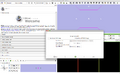
[DICOM to DWI]
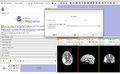
[DWI to DTI]
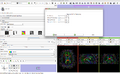
[DTI to Fibers]
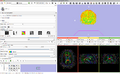
[Fibers]


In order to generate this wizard, we will use the For each step, we must:
- Obtain the input from the interface
- Validate the input
- Set up the parameters for the next step
API support for workflows
In order to do this, we use CTK's support for workflows:
- ctkWorkflowStackedWidget
- ctkWorkflowWidgetStep
In which the idea is to derive a new class from ctkWorkflowWidgetStep for each step and then add them all to the workflow widget ctkWorkflowStackedWidget making the transition explicit
Events of each workflow widget step (ctkWorkflowWidgetStep)
- createUserInterface
- onEntry(comingFrom, transitionType)
- onExit(goingTo, transitionType)
- validate(validationSucceded, desiredBranchId)
Obtaining the input from the Interface
You can find the example at
Modules/Scripted/Scripts/DICOM2FullBrainTractography/DICOM2FullBrainTractographyLib/full_tractography_workflow.py
In this example there is a helper class that makes things easy for linear workflows:
WorkflowConfiguration
This class:
- Takes the widget for each step from a UI file generated by the designer
And requires
- Each step to be declared as the name of such file
- The fields from each step to be declared
- The validation for each step to be implemented
Declaring the Modules
   step_widget_files = [
       'dicom2nrrd',
       'dwi2dti',
       'dti2fibers',
       'done',
   ]
Declaring Each Module's Fields
   step_widget_fields = {
       'dicom2nrrd':[
           ('DICOMRadioButton', 'checked'),
           ('NRRDDWIRadioButton', 'checked'),
           ('inputDicomDirectory', 'directory'),
           ('outputVolume', 'currentPath'),
           ('useBMatrixGradientDirections','checked'),
           ('inputNRRDVolume','currentPath'),
       ],
       'dwi2dti':[
           ('leastSquaresEstimation', 'checked'),
           ('weightedLeastSquaresEstimation', 'checked'),
           ('thresholdParameter', 'value'),
           ('removeIslands', 'checked'),
           ('applyMask', 'checked'),
       ],
       'dti2fibers':[
           ('seedSpacing','value'),
           ('stoppingFAValue','value'),
           ('minimumFAValueSeed','value'),
           ('stoppingTrackCurvature','value'),
       ],
       'done':[],
   }
Validating Data for a Field
 def validate_dicom2nrrd(self, step_object, data):
       if data[step_object.id()]['DICOMRadioButton']:
Running a CLI module from a python script
           self.dicomtonrrdconverter_parameter_node = slicer.cli.run(
               slicer.modules.dicomtonrrdconverter, self.dicomtonrrdconverter_parameter_node,
               data[step_object.id()],
               wait_for_completion = True)
Validating the result of a CLI module
          if self.dicomtonrrdconverter_parameter_node.GetStatusString() == 'Completed':
               file_path = data[step_object.id()]['outputVolume']
               result_status, node = slicer.util.loadVolume(
                   file_path,
                   True
               )
           else:
               result_status = False
Setting data for the next module
           if result_status:
               self.dwi_node = node
               self.dwi_node_name = node.GetID()
Output errors if needed
       if not result_status:
           display_error("Error in DICOM to NRRD conversion, please see log")
       return result_status
Details on Each Step's CallBack Implementation
Entry Callback
   def onEntry(self, comingFrom, transitionType):
       comingFromId = "None"
       if comingFrom: comingFromId = comingFrom.id()
       super(GeneralizedStep, self).onEntry(comingFrom, transitionType)
       if hasattr(self, 'onEntryCallback'):
           self.onEntryCallback(self, comingFrom, transitionType)
Exit Callback
   def onExit(self, goingTo, transitionType):
       goingToId = "None"
       if goingTo: goingToId = goingTo.id()
       super(GeneralizedStep, self).onExit(goingTo, transitionType)
       if hasattr(self, 'onExitCallback'):
           self.onExitCallback(self, goingTo, transitionType)
Validation Callabck
   def validate(self, desiredBranchId):
       validationSuceeded = True
       if hasattr(self, 'validateCallback'):
           validationSuceeded = self.validateCallback(self, desiredBranchId)
       super(GeneralizedStep, self).validate(validationSuceeded, desiredBranchId)

